
cloudtimemanager.com

Time Tracking
That Works — Even
When Your
Internet Doesn't

Software-only platform with offline-first mobile, live dashboards, and AI-powered auto-scheduling. No fingerprint clocks. No expensive hardware. Just a platform your team actually wants to use.

Offline-First Mobile

Live Dashboard​

AI Auto-Scheduling​

Labor Law Compliance​

On-Demand Pay​

No Hardware Needed​

Trusted by 5,000+ businesses · Syncs with your payroll provider

QuickBooks

ADP

Gusto

QuickBooks

Paychex

Rippling

Workday

99.9% Uptime

256-bit SSL

GDPR Ready

The Problem

Still Buying $400 Fingerprint Clocks?

Legacy time tracking was built for a different era. Here’s what it’s actually costing your business.
Legacy time clocks cost hundreds of dollars per unit, break down constantly, and can’t go to a job site. The “mobile apps”
that come with them are afterthoughts — they need constant internet, have no scheduling, and crash more than they clock.

Your team deserves better than hardware that doesn’t travel and software that doesn’t work offline.

Hardware Clocks Are Expensive & Unreliable

Fingerprint clocks cost $200–$500 each, break down, and require IT maintenance. They tie your team to one physical location.

Buddy Punching Is Costing You Real Money

Studies show 25% of employees engage in buddy punching. GPS and face-recognition clock-ins eliminate this completely.

Manual Payroll = Errors Every Pay Period

Spreadsheet time cards and manual data entry cause payroll errors, overtime miscalculations, and compliance violations.

Core Features

Everything Your Workforce Needs, No Hardware Required

Replace 3–5 different tools with one modern platform. Time
tracking, scheduling, payroll, and compliance — all connected.

Clock-In Anywhere

Employees punch in from their phone, a shared tablet, or any browser. PIN kiosk mode turns a $100 tablet into a time clock that replaces expensive fingerprint hardware. Photo capture at punch eliminates buddy punching without biometrics.

Drag-and-Drop Scheduling

Build weekly schedules by dragging shifts into place. Copy entire weeks. Set recurrence rules. Publish with one click and push notifications go out automatically. Or skip the manual work entirely and let the auto-schedule engine build it for you.

Offline-First Mobile App

The feature other platforms don’t offer. Workers clock in and out with zero internet connectivity. Punches queue locally on the device and sync automatically the moment a connection returns. Built as core architecture, not a workaround.

GPS Geofencing

Draw geofences on a map around every job site, office, or warehouse. Enforce that employees can only clock in when they’re physically inside the fence. GPS coordinates captured at every punch. Multi-site support with per-fence worker assignments.

Real-Time Live Dashboard

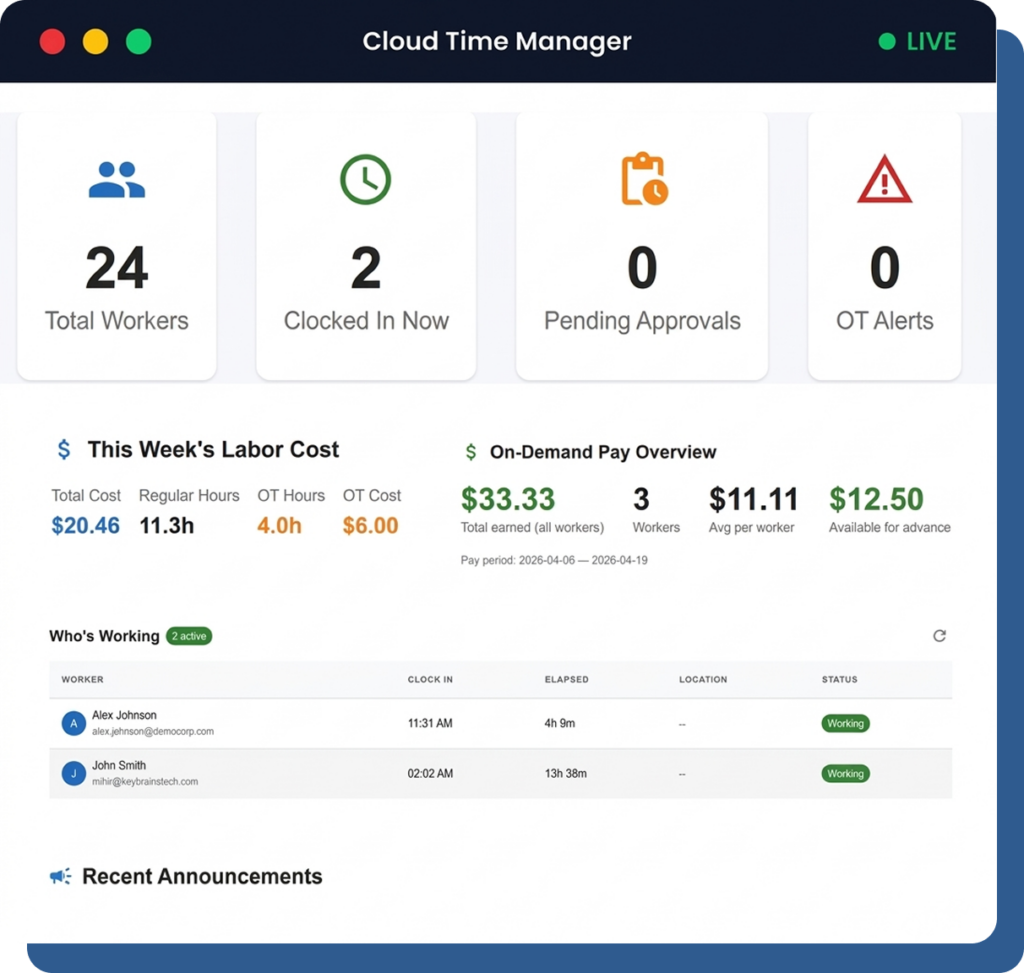
WebSocket-powered dashboards update the instant an employee punches. No refresh. No polling. No delay. See who’s on the clock right now, approaching-overtime alerts, and a live labor cost ticker — all streaming in real time.

On-Demand Pay

Give your employees access to the wages they’ve already earned — before payday. Workers see accrued earnings in real time on the mobile app and can request early access. Built into the platform, not a third-party bolt-on.

How It Works

Three Steps, No Hardware,
Live in 15 Minutes!

Legacy time tracking was built for a different era. Here’s what it’s actually
costing your business.

01

Employees clock in from phone, tablet, or browser — even offline.

Your team uses the devices they already carry. No hardware to ship, install, or troubleshoot. The mobile app works with zero connectivity. The browser dashboard works from any computer. PIN kiosk mode works on any shared tablet.

02

Managers see hours, locations, and costs update in real time.

The moment someone punches, your dashboard reflects it. GPS location, clock-in time, break status, overtime alerts, labor cost — all visible instantly through a WebSocket-powered live feed. No refresh button. No waiting.

03

Export to payroll in one click — or sync automatically.

When pay period ends, export hours directly to QuickBooks, ADP, Gusto, Paychex, or download a CSV. FLSA-compliant rounding rules, overtime calculations (daily, weekly, 7th day, California rules), and pay period locking keep your payroll clean and audit-ready.

Build a Week of Schedules in 30 Seconds

Our AI engine analyzes your historical data, employee availability, labor laws, and business rules to automatically generate optimized schedules — then you approve them.

❌ BEFORE — Manual Scheduling

✅ AFTER — AI Auto-Scheduling

90%

Less scheduling time

15%

Lower labor costs

98%

Coverage accuracy

The Only Time Tracking Platform That
Truly Works Without Internet

Restaurant wifi goes down. Job sites have no signal. Our mobile app uses local-first storage — employees clock in normally, and everything syncs the moment the connection returns. No lost punches. No data gaps. No payroll headaches.

Local Storage

Punches stored directly on the device

Auto-Sync

Syncs the moment connection returns

Zero Data Loss

Every punch is captured and verified

Industries We Serve

Built for Teams That Move

Whether your team works across a restaurant, job site, hospital, or retail floor — Cloud Time Manager adapts to how you work.

Restaurants

Auto-scheduling for variable demand. Shift swap and pickup for high-turnover crews. Minor labor law enforcement for teen workers. Kiosk PIN mode on a shared tablet at the host stand. Real-time labor cost dashboard. Offline mobile for food trucks with no WiFi.

Retail

Multi-location labor dashboards. Seasonal staffing with auto-schedule. Kiosk mode at back-of-house. Minor labor law compliance for part-time teen workers. Shift swap for coverage gaps. Per-store reporting.

Construction

Offline-first mobile is the hero feature. GPS geofencing per job site. Workers clock in from the field with no connectivity — punches sync later. Multi-geofence support for crews moving between sites.

Healthcare

Auto-scheduling for complex 24/7 shift rotations. Real-time dashboard for who’s on the floor right now. Overtime alerts for fatigue management. Shift swap with manager approval. Break compliance enforcement.

Manufacturing

Kiosk PIN mode for shared terminals on the production floor. Shift differential support. Real-time who’s-on-clock dashboard. Overtime management for hourly-heavy workforce. Break auto-deduction.

Franchises

Multi-company architecture maps to franchisor → franchisee → employee. Per-location settings for local labor laws. Centralized reporting with per-store breakdowns. Scalable across every location.

Five Things Other Time Clock Platforms Don’t Do

01

Offline-First Mobile

Unique

Workers clock in/out even with zero connectivity. Punches queue locally and sync when back online. Other platforms require a constant internet connection.

02

Real-Time WebSocket Dashboards

Unique

Live feed updates the instant someone punches. No refresh, no polling, no delay. Most platforms poll every 30–60 seconds or require manual refresh.

03

Auto-Schedule Engine

Unique

Demand-analysis-based auto-scheduling that builds optimized shift plans respecting overtime, availability, skills, and labor law constraints. Goes far beyond drag-and-drop.

04

Minor Labor Law Enforcement

Unique

Demand-analysis-based auto-scheduling that builds optimized shift plans respecting overtime, availability, skills, and labor law constraints. Goes far beyond drag-and-drop.

05

On-Demand Pay Infrastructure

Unique

Earned wage access built into the platform. Employees see accrued earnings in real time and can request early access. Not a third-party integration — it’s part of the product.

Customer Stories

Real Businesses. Real Results.

Join thousands of businesses  that replaced their old system with Cloud Time Manager.
We dropped our old scheduling platform and cut scheduling time in half. The auto-schedule engine alone saves our GM four hours every week. And our teen workers are actually compliant now — the system won’t let us schedule them outside legal hours.
Sarah Chen
Operations Manager · Pacific Grill Group
We replaced three separate tools — a time clock, a scheduling app, and a spreadsheet — with one free platform. The real-time dashboard is addictive. I can see labor costs updating live while I’m planning the next week.
Diana Reyes
Franchise Owner · FastFresh (12 Locations)
Our crews work on sites with no cell service half the time. With our old system, they couldn’t clock in at all. Now they clock in offline and it syncs when they get back to the truck. We haven’t lost a single punch since we switched.
Marcus Johnson
HR Director · BuildRight Construction
Why Switch?

Our Software Beats Traditional Hardware’s, Every Time!

If you’re using a fingerprint kiosk, a punch card machine, or any hardware-based time clock, here’s what you’re missing.
Cost Comparison
Hardware Cost
Monthly Cost
Mobile App
Scheduling
Auto-Scheduling
Live Dashboard
Shift Swap / Pickup
On-Demand Pay
Geofencing
Setup Time
Job Site Use
Hardware Time Clocks
$200–$500 per unit
$2–$6/employee/month
Weak or none, requires internet
None or basic
Not available
Manual refresh or pollingOn-Demand Pay (EWA)
Not available
Not available
Ship hardware + install + configure
No setup fees
Can’t travel to job sites
Cloud Time Manager
$0 — runs on devices you already own
$0/user/month — completely free
Offline-first — works with zero connectivity
Full drag-and-drop + auto-schedule engine
Demand-analysis optimizer, built in
WebSocket real-time — instant updates
Employee-initiated, manager-approved
Built-in earned wage access
GPS geofences on any device
15 minutes, no hardware
Works anywhere with or without internet

Not a Legacy App from 2012

Cloud Time Manager is a cloud-native platform built for speed, reliability, and real-time performance. Modern frontend, modern backend, modern mobile — not a decade-old codebase with a fresh coat of paint.

Built by Host Merchant Services

Workers clock in/out even with zero connectivity. Punches queue locally and sync when back online. Other platforms require a constant internet connection.
Technology Stack

Frontend

React 19 + Material UI 7 — fast, responsive, accessible

Backend

Express + MongoDB — scalable API with secure authentication

Mobile

React Native 0.84 — native iOS and Android with offline punch queue

Real-Time

WebSocket-powered dashboards — instant updates, zero polling

Maps

Interactive geofence UI with GPS boundary management

Payroll

FLSA rounding, configurable overtime rules, pay period locking

Export Hours to the Payroll System You Already Use

Cloud Time Manager is payroll-agnostic. Export clean, audit-ready hours to any provider with one click.
FLSA-compliant rounding. Configurable overtime. Pay period locking. Hours broken down by department, location, and project.

The Only Time Clock That Enforces Minor Labor Laws

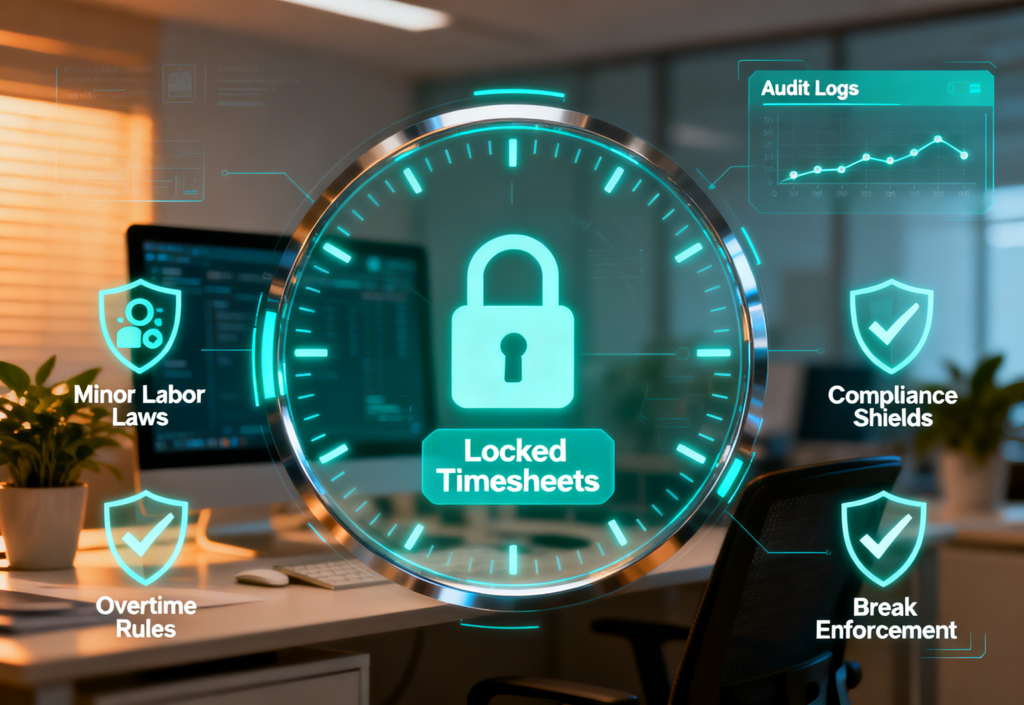
No other time and attendance platform natively enforces minor labor laws. Cloud Time Manager’s rules engine reads each employee’s date of birth, applies state-specific regulations, and automatically flags or blocks scheduling and clock violations for minors.
On top of that: FLSA overtime compliance with configurable rules, meal and rest break enforcement with auto-deduction, immutable audit logs for every timesheet change, and pay period locking so approved hours can’t be modified after the fact.
If you employ anyone under 18 — in restaurants, retail, seasonal work, or anywhere else — this feature alone is worth the switch.

Every Feature. Every User. $0/Month.

Cloud Time Manager is built by Host Merchant Services — a company that’s been helping businesses with payments, point-of-sale, and business technology since 2008. HMS already has a sustainable business. We didn’t build this tool to sell subscriptions. We built it because the businesses we work with needed a better way to track time and manage schedules.
By offering Cloud Time Manager for free, we give businesses a genuinely useful tool and strengthen the relationship between those businesses and the HMS ecosystem. There’s no hidden plan to introduce paid tiers. The full product is free and stays free.

All of it. $0.

Time tracking

Scheduling

Auto-schedule

GPS

Geofencing

Kiosk

Shift swap

PTO

Reports

Payroll export

Compliance

Audit logs

Ready to Ditch the
Hardware?

No credit card. No hardware. No paid tiers. Just enter your email and go live in 15 minutes.
100% free. Every feature included. No credit card required.