
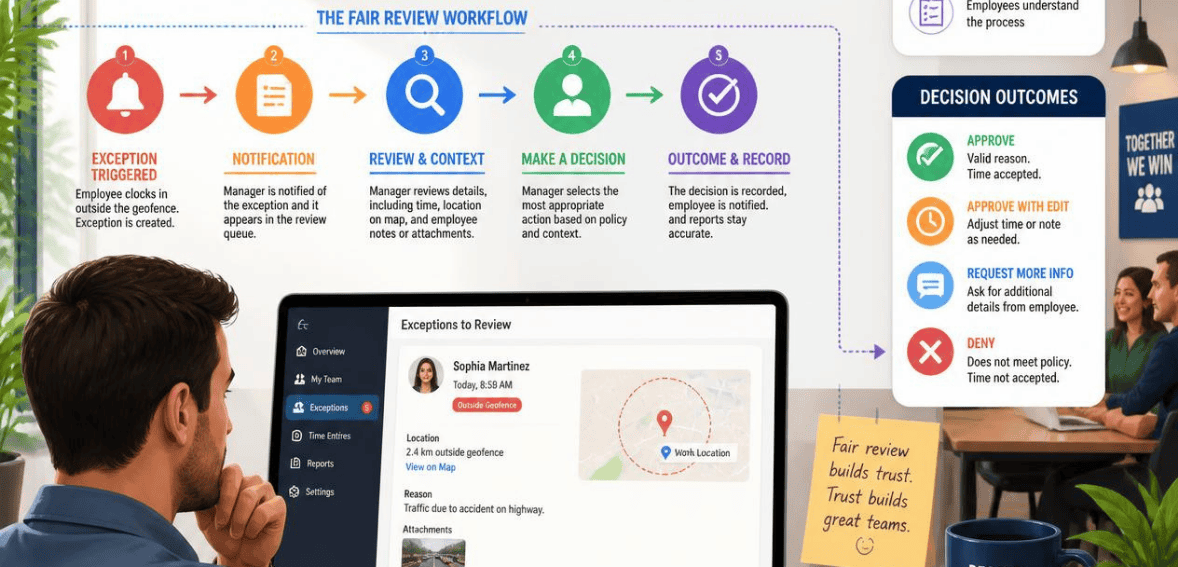
A punch lands two blocks outside the job site. Was it time theft? A supply run? Or just GPS drift bouncing off a steel frame? At first glance, most managers can’t tell. That single flagged punch is a geofence clock-in exception. And how you handle it shapes your payroll accuracy, your legal exposure, and whether your crew trusts the time clock at all.
It’s easy to turn every out-of-zone punch into a problem. It’s actually an efficient use of time to consider an out-of-zone punch as “review this.” Looking at it as “do not pay this” isn’t right. There is a good methodology for conducting reviews, which this guide will explain. It passes audit, payroll, and workforce tests. It holds up.
What Is a Geofence Clock-In Exception?
Geofencing draws a virtual boundary around a job site, office, or client location. When an employee clocks in, the app checks their GPS position against that boundary. If the punch falls outside it, the system flags the entry. That flag is the exception.
A geofence clock-in exception is an exception to the rule for clocking in at the expected location. It can be a time punch for an off-site location, a missed time punch, clocking out from a different zone, or a punch with a weak GPS signal. The exception is not a verdict. It is the system indicating to a human reviewer that the exception should be processed further and reviewed. Good time capture systems classify exceptions as clear deviations from the norm; managers are only tasked with exceptions for which judgment is required.
Why Geofence Clock-In Exceptions Happen
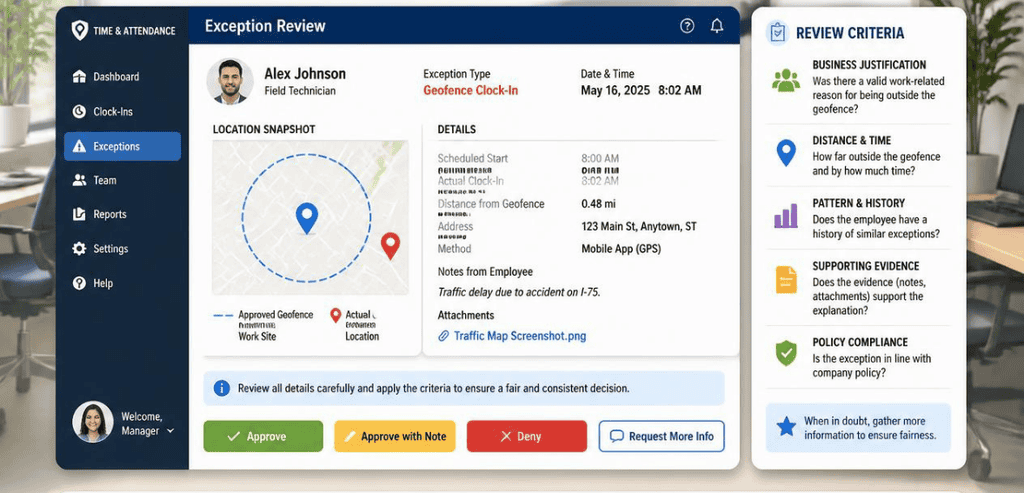
Here’s the part managers often miss. Most exceptions are not fraud. They’re the messy reality of field work meeting a clean digital boundary.
GPS Drift Is Real
Signal accuracy is never 100 percent. Steel framing, dense city blocks, massive multi-acre developments, drifting GPS, and low-signal areas can all cause GPS drift. A worker can look like they are on the other side of the street even if they are standing right on the job site. While standing in a building, the pin may wander. A technician may even arrive at the loading dock of a hospital only to have the punch register at the hospital front desk, since that is where the official address is. Drift also buries supervisors with exceptions they must address by knocking them down every Friday if your system blocks punches too aggressively.
Legitimate Off-Site Work Is Normal
Field crews move. A worker gets sent to a supply house. Someone stages equipment nearby. Access to the site is blocked, so the crew punches in from the perimeter. A merchandiser visits five stores before lunch. A job site spreads across a footprint that shifts week to week. Every one of those is a valid reason for an off-fence punch. The workflow has to absorb these facts without turning each shift into a payroll dispute.
The Fairness Problem: Flag vs. Block
There are two ways to configure a geofence, and the choice drives everything downstream.
A blocking setup completely disallows a punch when the worker is out of this particular zone. This feels both tight and like a good anti-fraud measure. The downside is that it punishes workers for a weak signal, resulting in many failed clock-ins that the manager has to unblock each pay period. For Job Site A, the employees assigned should not be allowed to punch in at Job Site B. Thus, blocking punches is warranted for this setup. Unfortunately, blocking punches everywhere will break the system.
The flagging setup allows punches to go through and be marked for subsequent management review. The worker is still able to clock in. The system also captures what actually transpired in the process. At this setting, management is able to retain control without having to review every time entry. This setting of flagging with review is both a better and fairer approach for the majority of field teams. The objective is not to attempt to capture bad signals. Rather, the goal is to have a timecard that is both clean and understandable in the event an explanatory review is ever needed in the case of a dispute.
Building a Fair Geofence Clock-In Exception Review Workflow
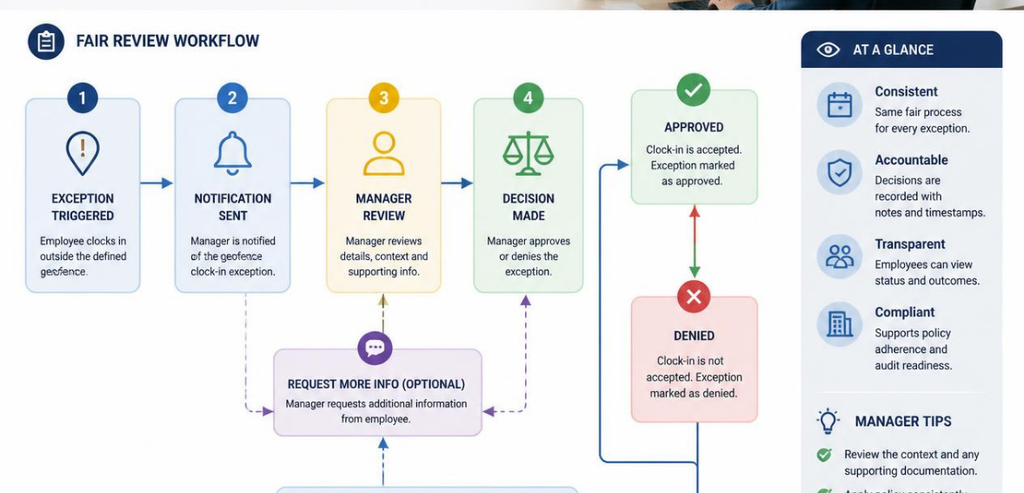
A strong review workflow is repeatable, quick, and documented. It should feel routine, not adversarial. Here’s the shape of one that works.
Verify the GPS location of the employee at punch-in/out. Stop at those positions. Background tracking shall not occur between punches or while the employee is off-site/out of the office. Time punches capture attendance, and only capturing attendance at the moment of the punch is privacy-friendly and reduces battery drain. Your team will notice the difference, and it is important for legal exposure.
Flag, route, and assign a responsible party. An out-of-zone punch or missed check-in should not result in a note in the dashboard. It should be a clear, routed request with an assigned responsible party. Each exception requires a responsible party and an approval process that you have predefined. A typical punch only takes a second. An exception requires focus.
Let the employee provide a reason. The employee knows why time was punched at that location. Allow the employee to provide a reason at the time of the punch or in response to a prompt. Example: “Directed to supply house by foreman.” “Site gate locked, punched from truck.” This turns a time punch into a quick approval and avoids defensive conversations.
Approve with a written reason. When a manager approves or edits a time punch, a reason for the approval is documented. Reasonable decisions regarding time punches are written. Edits that are not documented are not reasonable. Approved hours then become payroll time with the reasons documented for pay rules, overtime, and job costing.
Create a record of all transactions with time, value changes, user ID, original value, and rationale. This record forms the basis for a defensible system. A record of this nature justifies changes made to an employee’s hours. This record also defends the organization if an audit is undertaken. It is advisable to issue strict lockouts in rare situations. In the majority of cases, GPS breadcrumbs should be used in conjunction with geofence rules and supervisor review.
The review of exception data should include analysis of the exception data over a period of time. This contains several data points that are potential indicators of a greater issue, including supervisory changes, changes that result in a reduction of work hours, punch times that cluster at the start of overtime, and duplicate clock times. These issues are typically identified in the review of exception data.
Staying Compliant With FLSA and State Privacy Laws

A fair workflow isn’t only good management. It’s how you meet the law.
Under the Fair Labor Standards Act, employers must keep exact hours worked for non-exempt employees. Timesheets can be edited, but only by a formal written request and a record of the reason. Edits that do not follow these rules or are misleading put an employer at a material risk of non-compliance.
The U.S. Department of Labor’s FLSA recordkeeping guidance states that payroll records must be retained for three years and time records for two years, but most attorneys say everything must be retained for four to five years to cover the more restrictive time periods set by individual states. Should records be missing in a dispute, the court will allow the employee to describe the estimate of hours worked. This puts the employer at a huge disadvantage.
There are separate rules for location data. Currently, there are no federal laws to prohibit employee tracking on a GPS; therefore, each state has created its own laws, and a number of these laws require notice and/or consent prior to tracking. States such as California and Connecticut have the most restrictions. The best route is to track location only during the workday, create a GPS policy that is clear, and have the employees read and understand the policy prior to its implementation. Reviewing the laws on geofencing with a lawyer is recommended. While you can direct employees to a desired location, punitively using location data to track can be a violation of the law.
Tools That Support a Fair Exception Workflow
The workflow matters more than the brand. Still, the platform you choose either makes fair review easy or fights you at every step. A few approaches are worth knowing.
Workyard
Workyard uses GPS location tracking on a continuous basis during the workday to define location as attendance and also to use geofencing for reminders to clock in and out. This system allows a supervisor to backtrack to see a detailed record of employee whereabouts in the event an employee’s GPS shows them to be working off-site. Potential customers should know that geofencing automation features are included in higher plan tiers and users in metropolitan areas have concerns about accuracy.
Connecteam
Connecteam has focused its GPS products on tools used to track employees only during working hours. It has a geofence time clock for tracking employee time and attendance and a feature also known as breadcrumb history, along with automated clock-outs for employees who leave a work location. On the whole, this framing of the product as used on the clock is a good default from the standpoint of privacy since it constrains the collection of data to the time of recording for which there is a clear business purpose and need for tracking.
TimeTrex
TimeTrex describes the off-fence punch as a clear signal to perform a review and not as a reason to delay payment. TimeTrex’s daily exception review is targeted toward off-site punches, missed punches, overtime, and break exception reviews and reviews punches in an approved format ready to be uploaded to payroll, as well as the required fields for pay rules and job costing. Their timecard design recognizes that different crews require different fence strategies and is consistent with the nature of field work.
When you evaluate any of these, consider this: Does the software indicate exceptions clearly, allow a supervisor to approve changes or additions with a reason, and maintain an audit log? If yes, the timecard remains fair, defensible, and useful for payroll.
Conclusion
A geofence clock-in exception is not an accusation. It’s a question. Treat every off-site punch as guilt, and you’ll bury your managers in cleanup and erode your crew’s trust. Treat it as a prompt for a quick, documented review, and you get the opposite: accurate payroll, a clean audit trail, and a team that believes the system is fair.
The recipe is simple to say and worth the effort to build. Flag instead of blocking by default. Capture location only at the punch. Route each exception to an owner. Let workers explain, resolve with a reason, and log every change. Do that, and your time capture controls stop being a source of friction and become what they were meant to be: a fair and reliable record of the work.
Frequently Asked Questions
What is a geofence clock-in exception?
It’s a time punch that falls outside the expected location boundary set for a job site or office. The system flags it for manager review. It can mean an off-site punch, a missed check-in, or simply a weak GPS signal. The flag is a prompt to look closer, not a decision to deny pay.
Should I block or just flag out-of-zone punches?
For most field teams, flag and review is the fairer default. Blocking every off-site punch punishes workers for GPS drift and floods managers with failed clock-ins to fix by hand. Reserve strict blocking for narrow cases, such as stopping a crew from clocking in at the wrong job site.
Can I edit an employee’s flagged timecard?
Yes, but only with a legitimate reason and proper documentation. Under the FLSA, edits are allowed when you record the original value, the change, who made it, when, and why. Silent or misleading edits create compliance risk and can hurt you in a wage dispute.
Is geofence time tracking legal?
Generally yes, during work hours, but the rules vary by state. Several states require written notice or consent before tracking, and states like California have stronger protections. Limit location capture to on-the-clock moments, write a clear policy, and get employee acknowledgment before rollout.